
One Windows update away from losing all your qbase+ data. It only takes one minute to bring it to Clarida.
Free, read-only, and yours to keep. When you're ready, the rest of your qPCR workflow lives in the same place.
Where qbase+ data lives now
qbase+ shipped on lab desktops and laptops because that's how desktop software worked. You installed it, you opened it, you analyzed your runs, you saved your experiments. Years later, those experiments are still there: on a laptop, an external drive, a server that nobody quite remembers the password for.
The data is fine. But the access to it is increasingly fragile. Windows updates break the install. The laptop gets reassigned. The lab moves buildings. One day someone needs an old result for a paper, a reviewer comment, a new project, and the path back to it has gotten harder than it should be.
That's the problem Clarida fixes.
What gets imported
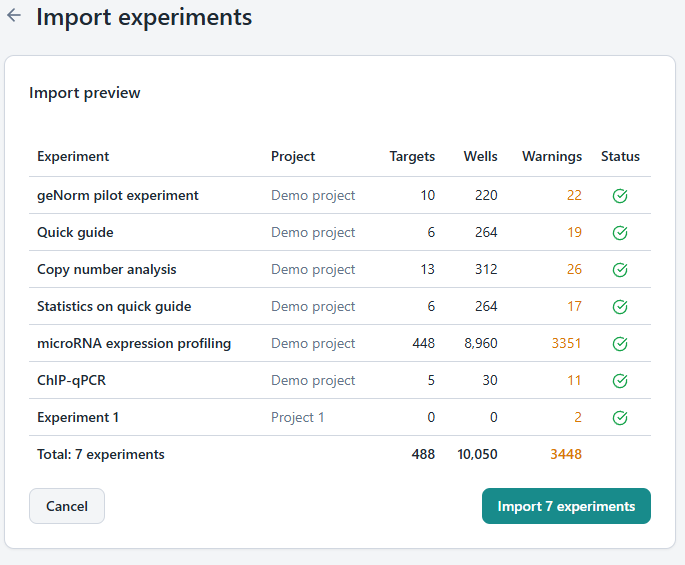
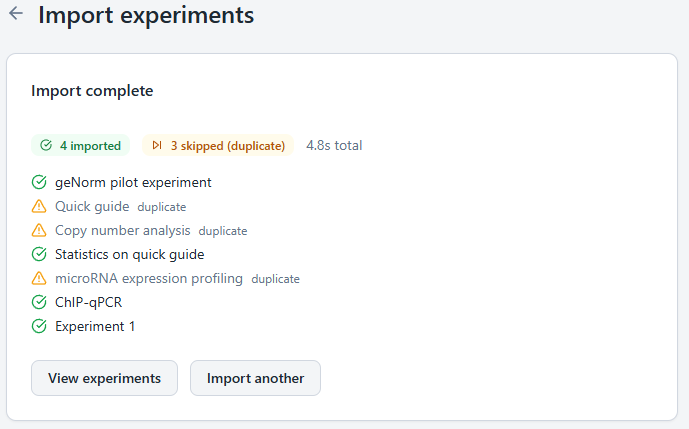
Clarida now imports qbase+ workspaces directly. Drop in your project file, and your experiments (the runs, the samples, the reference genes, the Cq values, the layouts, the notes) appear in your Clarida workspace, structured exactly the way qbase+ saved them.
The import is read-only. We don't reanalyze, recompute, or modify anything. Your archive is preserved as you left it: a faithful, searchable copy of your work, sitting in your Clarida account.
Read-only is on purpose. Different analysis settings produce different numbers. We don't impose ours on results you already published. The qbase+ archive in Clarida is what your experiments were when you last saved them.
That's the trade: the past, exactly preserved. The present, properly continued.
Every qbase+ workspace, every plate format
The import covers the full qbase+ workspace structure (every project, every experiment, every plate) regardless of plate format. 96-well, 384-well, 1536-well. Single experiments or workspaces spanning hundreds of plates. Whatever your lab ran on qbase+, Clarida imports it.
Free, forever
Importing your qbase+ archive into Clarida is free, and so is keeping it there. No quota on imported workspaces, no card required, no expiry. A free Clarida account is enough to hold your full history.
Your data lives in open formats throughout: RDML, Excel, standard CSV. There's no proprietary lock-in.
Imported archives don't count toward any quota. If you create new experiments in Clarida, those follow the regular plan limits.
What the import is, and isn't
The qbase+ import is for archive preservation. One thing isn't part of it: a re-implementation of qbase+'s analysis engine inside Clarida. Clarida has its own analysis pipeline, with the same algorithms, refined and extended. The longer story of what happened to qbase+ is told elsewhere.
What the import does is keep your historical work accessible: with your experiments and their data intact, available from any device, and safe from the laptop it currently lives on.
Ward Hellemans
Co-founder, Clarida
Product manager of qbase+ for years at Biogazelle. Spent that time watching researchers use it in labs around the world. Now co-founder of Clarida, focused on the workflow around the science.
Frequently asked questions
Your experiments and their data: runs, samples, reference genes, Cq values, plate layouts (96-, 384-, 1536-well), and your notes.
By default qbase+ stores the workspace at \Users\<username>\workspace on Windows or macOS. If you've moved it, you can recover the path by opening qbase+ and using the Switch workspace option, which shows the current location. From there it's a regular folder, so you can copy, move, or back it up like any other folder before bringing it to Clarida.
No. qbase+ already stores your work as plain files on disk, so there is nothing to export or convert. You point Clarida straight at the files qbase+ wrote, and the import reads them directly. qbase+ does not need to be installed or running.
Either. To bring everything across at once, select your whole workspace folder (the one containing kernel.xml) and Clarida discovers all projects and experiments inside it. To bring just one experiment, pick its experiment.xml file, found under Projects\<project>\Experiments\<experiment> in the workspace.
Yes, on purpose. Imported workspaces in Clarida are a faithful archive: we don't reanalyze, recompute, or modify anything. To run new analyses, create a new experiment in Clarida and bring your data in fresh.
Nothing. Importing and keeping qbase+ archives in Clarida is free, with no expiry and no card required. Imported archives don't count toward any quota. If you create new experiments in Clarida, those follow the regular plan limits.
Your data lives in open formats throughout: RDML, Excel, standard CSV. There's no proprietary lock-in.
The import doesn't affect your local qbase+ install. Your existing setup is unchanged. Clarida holds a separate, cloud-backed copy of your work.
A minute or two for typical workspaces. Larger archives, with hundreds of plates and many experiments, take a bit longer.
Only you, unless you invite collaborators to your workspace. The same privacy model as a private qbase+ install.