Most of the past six weeks went into infrastructure. Authentication, database migrations, a new import engine. Important work, but not the kind of thing you see while you work. So let me focus on what you will notice.
We shipped our first community tool with real experimental and scientific value: a Reference gene finder based on the geNorm algorithm.
Setting up a stable foundation.
Jan
New features
Find your most stable reference genes
Choosing the right reference genes is one of those decisions that impact the quality of your entire qPCR experiment. The geNorm algorithm, Vandesompele et al. (2002), solves this by ranking candidates by expression stability. We wanted geNorm within reach of every lab at no cost, so the Reference gene finder is a community tool.
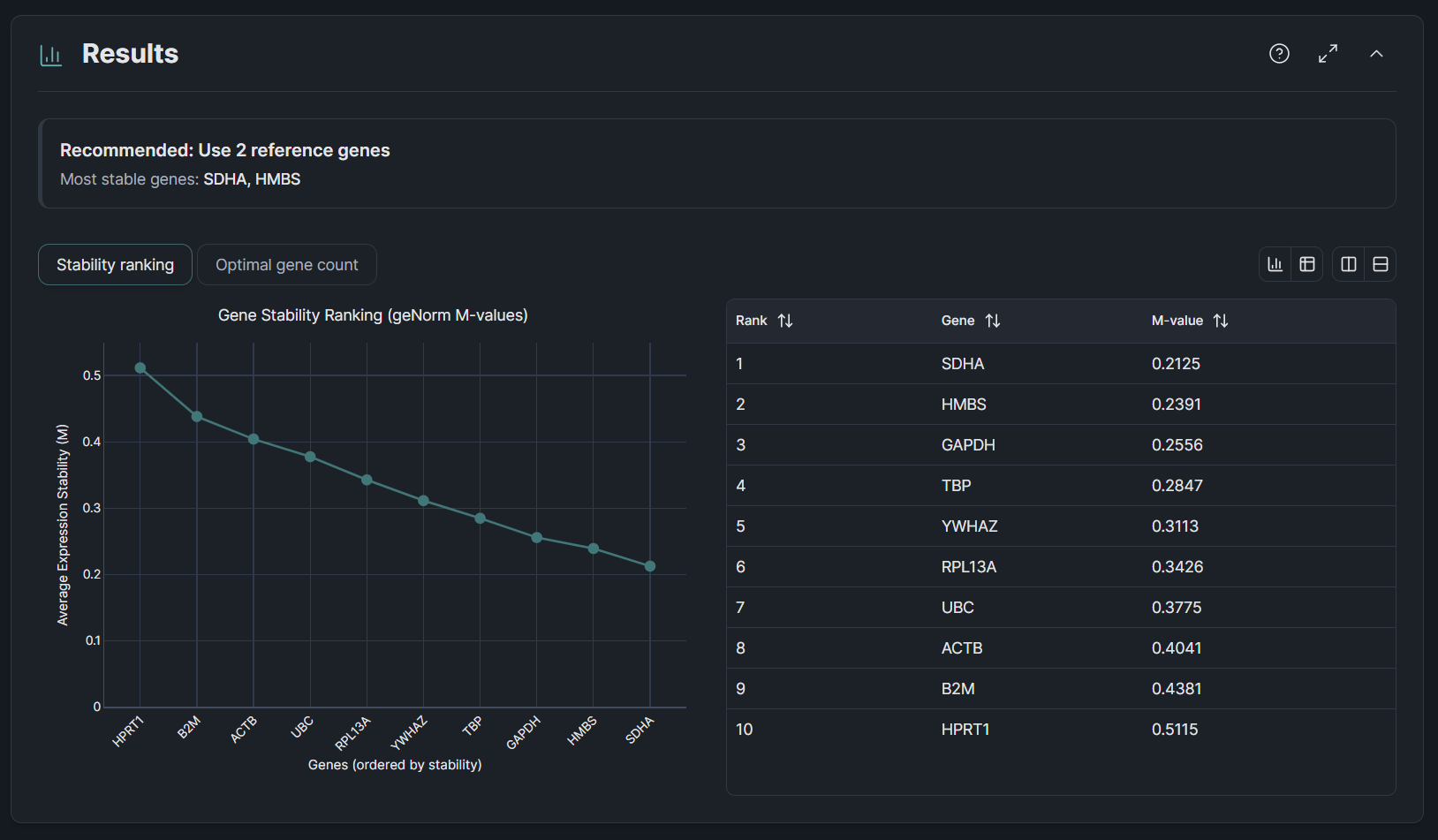
The Reference gene finder offers this algorithm free, with nothing to install. Paste your Cq data, and you see which candidates are most stable across your samples, how many reference genes you need, and where the diminishing returns kick in. It is free for everyone.
Quality of life
- Unified file import · The qPCR workflow, plate homogeneity and the Reference gene finder now share one import engine. Drag and drop works the same whether you are in the app, the plate homogeneity tool, or the Reference gene finder. Under the hood, we replaced SheetJS with ExcelJS to read large files more reliably.
- Interactive charts · Measurement data now renders as interactive Plotly charts. Hover for values, zoom into regions of interest, export as PNG. A step up from the static images in 2026.1.
- Accounts and workspaces · Clarida now has proper authentication. Sign in, and your experiments persist across sessions.
- Community tools in one place · The plate homogeneity tool, concentration converter, and Reference gene finder now live together in the Clarida app, one address to find and bookmark.
- Smoother note-taking · Experiment notes no longer reset your cursor when auto-saving. A small fix, but one you would have noticed every time you typed a longer observation.
- Heatmap color fix · Wells with missing Cq values in the plate homogeneity tool now display correctly instead of breaking the color scale.
Changes that may affect you
No changes to analysis algorithms or result calculations in this release.