After a qPCR run finishes, the instrument leaves a run file, and its software can export a table of quantification cycle (Cq) values, one per well or well-dye combination. The Import & annotate section brings the run file or the Cq table into a Clarida experiment, where the data can be quality-controlled, normalized, and explored. A run file brings the raw amplification curves along, and the melt curves when the run has a melt step, so Clarida can also call Cq itself; a Cq table brings the values as the instrument software recorded them.
The terms used throughout, such as quantification cycle (Cq), dye, and the sample-type codes, follow the MIQE 2.0 guidelines (Bustin et al., 2025) and the RDML data standard (Lefever et al., 2009), the reference vocabularies for reporting qPCR.
How to covers bringing one run file in, from the drop zone to a reconciled run; How it works explains which files Clarida reads, how a table's columns are matched, and why the steps depend on the design.
How to
1. Import the run file
In the experiment, open Import & annotate and drop the run file on the drop zone, or click it and pick where the file is: This computer, or an instrument PC connected through Porta. Each file, and each sheet of an Excel workbook, becomes a source. See Run files: CFX, QuantStudio and others for what Clarida reads.
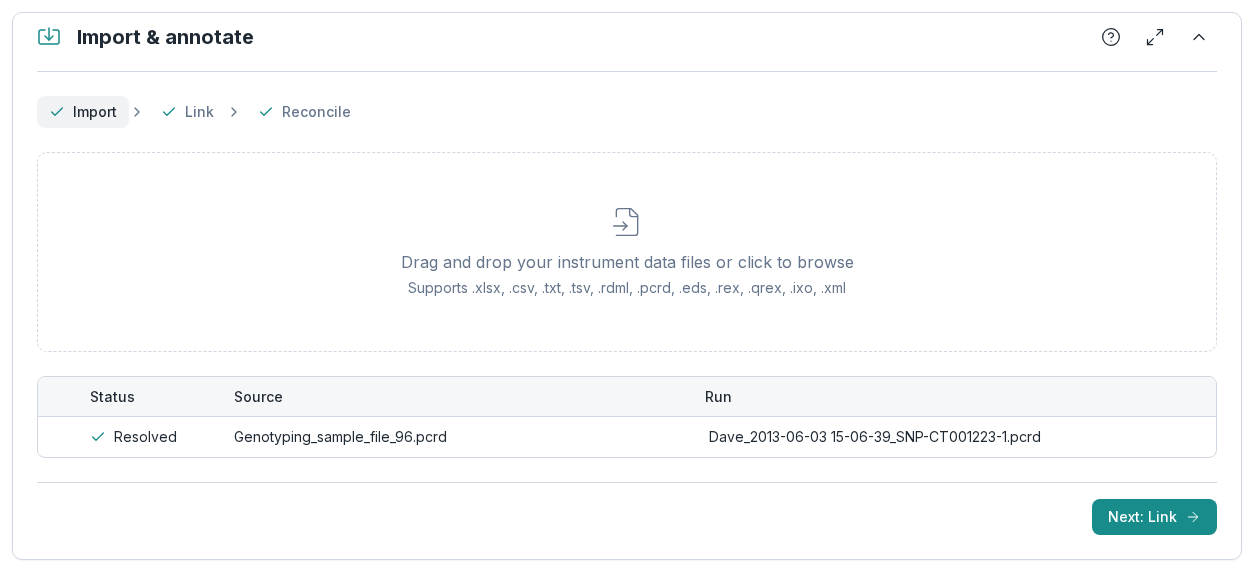
2. Link it to a run
Choose Next: Link. Each source is linked to a run of the design, or becomes a run of its own with + Promote to new run when no designed run applies. A staged link can be cleared with Unlink before it commits. In an analysis-only experiment there is no design, so this step completes by itself.
3. Reconcile the annotation
Choose Next: Reconcile. Where every well matches the design, the run merges by itself. Otherwise it waits for one choice, Keep design or Accept imported, after each well with a different sample is settled. A merged run can be reset later. See Import, link and reconcile and One step without a design, three with one.
How it works
Run files and Cq tables
Clarida imports two kinds of file. A run file is the file the instrument itself writes: Clarida reads it directly, with the plate, the raw amplification curves, and the melt curves and the instrument's own Cq values when the file holds them. A Cq table is the per-well export of the instrument software: it carries the Cq values as that software determined them, and no curves.
Run files: CFX, QuantStudio and others
| From | File | What comes in |
|---|---|---|
| Bio-Rad CFX instruments | .pcrd | Plate layout, amplification and melt curves, instrument Cq |
| Roche LightCycler 480 | .ixo .xml | Plate layout with samples, amplification curves; targets, melt curves and the instrument’s Cq when the file holds them, otherwise Clarida calls Cq |
| Thermo Fisher QuantStudio and ViiA 7 (not the older 7500 and 7900HT files) | .eds | Plate layout, amplification and melt curves, instrument Cq |
| QIAGEN Rotor-Gene | .rex .qrex | Tubes listed by number with their samples, amplification curves, melt curves when run; the file has no Cq, so Clarida calls it |
| RDML The open data standard for qPCR, written by many instruments and tools | .rdml .rdm | Whatever the file holds: annotation, curves, Cq |
| Any instrument A Cq table exported from its software | .xlsx .csv .txt .tsv | Cq values and whatever annotation the table carries; no curves |
From a run file, Clarida keeps the instrument's Cq values as they are and can also call its own from the curves, in Raw data, by one of three methods: a fit to each well's log-linear phase (Ruijter et al., 2009), Baseline-threshold, or SDM (2nd-derivative max). While one of these is selected, the section shows the imported Cq beside Clarida's. By default the analysis uses the instrument's Cq when the file has it, and you can switch to Clarida's. A QIAGEN Rotor-Gene file holds no Cq at all, so Clarida always calls it.
Cq tables
Any instrument can be used through the Cq table its software exports. Importing it reuses the baseline, threshold, and amplification calls already made in the instrument software, and leaves those values unchanged.
The importer reads tabular exports (.xlsx, .csv, .txt, or .tsv) with one row per measured well, or per well-dye combination on a multiplex run. Two columns are required: the well position and the Cq value. The remaining columns are optional; when present, they are used to annotate the run or to match the import against an experiment's design.
| Column | Description | Recognized by (aliases) |
|---|---|---|
| Well ★ | Plate position A1–P24 | Well, Well Position, Pos, Position, Well Name |
| Cq ★ | Quantification cycle (blank = undetermined) | Cq, Ct, Cp, Cq Value, Ct Value, Cp Value, C(q), C(t) |
| Sample | Sample name | Sample, Sample Name, Sample ID |
| Assay | Target / gene measured | Assay, Assay Name, Gene, Gene Name, Detector, Target, Target Name |
| Dye | Reporter dye; resolves to a detection channel and identifies the target in a multiplex run | Dye, Reporter, Reporter Dye, Channel, Fluor, Fluorophore |
| Replicate | Replicate number | Replicate, Rep, Replicate #, Replicate Number, Bio Rep |
| Sample type | Unknown, standard, control, etc. | Sample Type, SampleType, Type, Content, Task, Category, Control Type |
| Quantity | Standard concentration | Quantity, Concentration, Conc, Std Conc, Standard Quantity, Input Quantity, Qty, Starting Quantity (SQ), Starting Quantity |
★ Required. All other columns are optional.
Instrument vendors use no common export format, so header names are matched case-insensitively against a list of known aliases; a column labeled "Ct Value", for example, is recognized as Cq. When the headers in a file cannot be recognized automatically, the source is flagged and its columns are mapped by hand instead of the import failing. An export is read as the instrument saved it.
Sample type is matched against a fixed set of recognized values, and Dye against Clarida's dyes and your workspace's own. Both tolerate missing or unrecognized entries instead of failing the import. A Cq table carries no assay type: its Type column is read as the sample type, and every target it brings starts as a gene of interest.
Dyes and detection channels
The export reports a dye: the reporter on the probe or reaction, the term used by MIQE and RDML. Each dye corresponds to a detection channel on the instrument, and on a multiplex well that reports several dyes, each dye becomes its own measurement (its own row in the export).
The Dye value on each row is matched, case-insensitively, against Clarida's dyes (FAM, VIC, HEX, CY5, CY5.5, SYBR, ROX, TAMRA, and Texas Red) and the dyes your workspace has added.
A dye Clarida does not know is not rejected: it is added to your workspace's dyes under the name in the file, and the measurement is imported on it. When no Dye column is present at all, the run is treated as singleplex and every measurement is read on SYBR, the default channel.
The dye also resolves which target a measurement belongs to. For a singleplex assay there is a single target, so this is unambiguous; for a multiplex assay, each measurement is matched to the target that uses its dye.
Negative controls: NTC, NAC, NRT and NTP
The Sample type value classifies each well as a sample or a control. It is normalized case-insensitively, accepting common variant spellings:
| Type | Meaning | Recognized values |
|---|---|---|
| Unknown | An ordinary test sample (the default) | unknown, unkn, unk, sample, qsUnknown, wcSample |
| Standard | A standard-curve point; pairs with the Quantity column | std, standard, qsStandard, wcStandard |
| NTC | No-template control | ntc, no template control, no-template control, no template, water, h2o, qsNegative, wcNTC |
| NAC | No-amplification control, omitting the polymerase (or, in RT-qPCR, the reverse transcriptase) | nac, no amplification control, no-amplification control, noamp |
| Positive | Positive control | pos, positive, positive control, positive template control, ptc, qsPositive, qsPosCalibrator, wcPostiveControl, wcPosCtrl |
| NRT | Minus-reverse-transcription (−RT) control | nrt, no rt, no-rt, -rt, rt-, minus rt, minus-rt, minusrt, wcNRT |
| NTP | No target present | ntp, no target present |
| Negative | A generic negative control, where the reason is not stated (Clarida’s own type, not RDML’s) | neg, negative, negative control, neg ctrl, negctrl, neg_ctrl, wcNegativeControl, wcNegCtrl |
| OPT | Optical calibrator | opt, optical calibrator |
All but Negative are sample types defined by the RDML data standard; Negative is Clarida's own. Several of them (NTC, NAC, NRT) are reproducibility-relevant controls under MIQE. A value that matches none of them, or a row with no Sample type at all, is treated as Unknown.
A specific negative control says why a well should stay clean: an amplifying NAC points at degrading probes, a signal in the NTC at contamination. NTC, NAC, NRT and NTP each name that reason (no template, no polymerase or reverse transcriptase, no RT step, no target). Negative exists because instrument software can offer only an unqualified "Negative Control" alongside its NTC, and Clarida records that verbatim rather than guessing which specific control was run. All five are treated identically in quality control: the well is expected to stay silent, and any signal is flagged.
Every type is viewable and settable in the Clarida interface. Sample type is not required for import, and wells left unclassified can be set later in the experiment.
A scaling calibrator is a role, not a type. The sample that relative quantities are scaled to under Scale to calibrator carries a Calibrator checkbox on the sample, so a positive control can also be the calibrator. An RDML file's calibratorSample flag sets the role on import. The LightCycler 480 "Positive Control/Calibrator" option (qsPosCalibrator) maps to Positive only, because the instrument offers positive control and calibrator as one combined option and a well cannot be told apart from a plain positive control. Mark the calibrator by hand instead, in the Library or in Sample prep. A negative control cannot be a calibrator.
Assay types
Sample type describes what was loaded into a well. Assay type describes what the assay measures, and the two are independent: a no-template control is a property of the sample, while a reference gene is a property of the assay. A run file can carry both.
Like sample type, the assay type is normalized case-insensitively, accepting common variant spellings:
| Type | Meaning | Recognized values |
|---|---|---|
| Gene of interest | The target being measured (the default) | gene of interest, gene_of_interest, goi, toi, target |
| Reference gene | A normalization target for relative quantification | reference gene, reference_gene, ref, reference, housekeeping, hkg |
| Positive control | An external positive control assay | positive control, positive_control, pc, ptc, pos_ctrl |
| Negative control | An external negative control assay | negative control, negative_control, nc, neg, neg_ctrl |
| Internal control | An in-sample control amplified alongside the target, validating that extraction and amplification worked for that sample | internal control, internal_control, iac, ic, ipc, endogenous control, extraction control |
The first two follow the RDML target types (toi and ref); RDML defines no control types, so the remaining three follow MIQE. The internal control, an internal amplification control (IAC) in MIQE terms, is distinct from both a reference gene and a positive control: it neither normalizes nor supplies template, but reports whether a sample was processed successfully. It is stored with each target and checked per sample in Sample & Assay QC, against its expected Cq window, as a positive control is.
A value that matches none of these is not rejected: the target is imported as a Gene of interest. When a run file carries no assay type, every target is treated as a gene of interest.
ntc is a sample type only. A target has no template to omit, so a negative-control assay is written as negative control or neg_ctrl.
Import, link and reconcile
The importer has three steps, Import, Link, and Reconcile, that address three separate questions:
- Import: what data is in the file? A file is not always a single dataset. An Excel workbook may contain one sheet per run, several unrelated sheets, or sheets that hold no Cq data. The import step reads each file, and each sheet, as a candidate source, and parses the ones that are selected.
- Link: which run does the data belong to? An imported source carries measurements but no record of which run produced them. Linking assigns each source to a run defined in the design, or promotes it to a new standalone run when no designed run applies.
- Reconcile: which annotation applies where they differ? When a source is linked to a designed run, two annotations of the same wells exist: the one defined in the design and the one carried in the imported file. Where every well matches, the run merges by itself; otherwise it waits for one choice, keep the design or accept the file, once each sample conflict is settled.
One step without a design, three with one
Linking and reconciliation only have something to act on when the experiment carries a design, so the number of steps that need attention depends on the experiment.
In an analysis-only experiment, created to process data with no design, there is nothing to link or reconcile against. Sources are promoted to runs automatically and the file's annotation is used as recorded, so steps two and three complete without any action from you. The import is effectively a single step.
In an experiment designed in Clarida, with plates laid out and samples and assays named, the imported data is checked against that design, and that is where linking and reconciliation earn their place. Because both are explicit, the imported file does not have to match the design exactly: sample names that differ, a workbook holding several runs, or a re-run that replaces earlier data are handled by assigning and reconciling sources rather than by demanding a fixed file format or naming scheme. Each action is reversible, since a staged link can be cleared before it commits and a merged run can be reset, so corrections do not require restarting the import.
After reconciliation is committed, the imported data is attached to its runs, and the experiment proceeds to quality control, normalization, and exploration.