The rules that hold
- A preset is a starting point, never a lock. Change which steps the experiment shows at any time, and each setting in the step where it applies.
- The experiment keeps where it came from. Define shows the preset it was launched from, and the settings set it uses with its version, and after a change, which set it came from and when.
- What you write here travels with it. The background, goal and links go into the notebook you export.
In this step
01In the app: Define › Setup
A preset opens the experiment ready to go
Pick a preset on the qPCR start page, where your lab pins the ones it uses most. A preset carries a workflow layout and a settings set, and can add samples, assays, markers, a mix, a cycling protocol and the instrument; Clarida’s starters hold just those two. Every new workspace also has demo experiments to open and try.
Clarida’s starters cover gene expression, reference genes, detection, genotyping and plate homogeneity; each but the last also comes as analysis only. Your lab makes its own, and kit makers can publish theirs.
- Start from: a pinned preset, any other in your library, or a blank experiment with Clarida’s defaults
- Start at: Define to plan the experiment, or Import when you only have a run

Read the method: Presets
02In the app: Define › Setup
The settings it starts from, and only the steps it needs
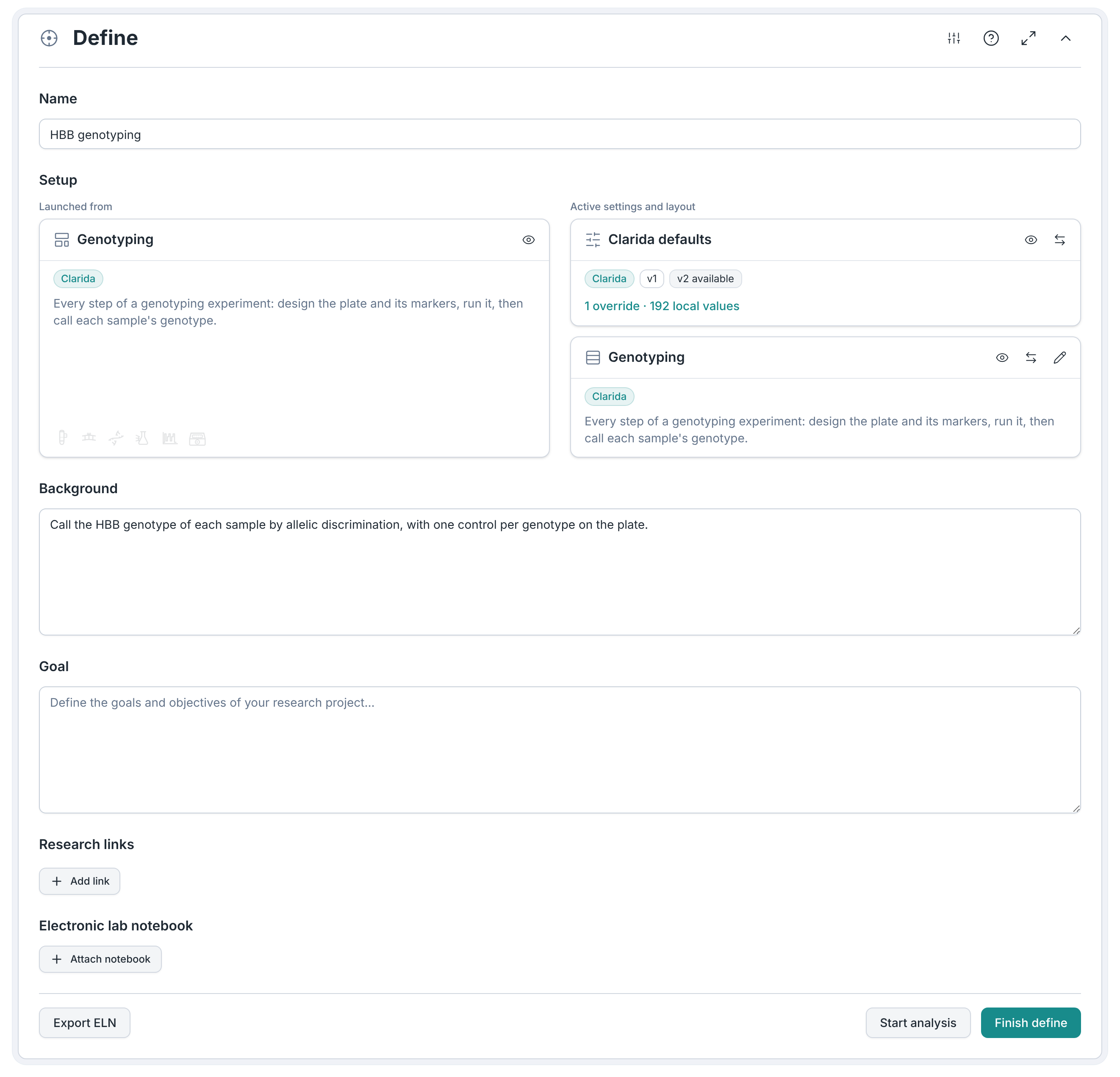
Define shows the experiment's settings set with its version, and how many settings this experiment changes, such as 3 overrides. Change it to another set, or update it when the set has a newer version. The workflow layout decides which steps it shows: a genotyping run doesn’t need everything a gene expression study does. Switch it, customize it for this experiment, or save a layout you like to your library.
- Settings set: keep it, change to another and keep or drop this experiment's changes, or update to a newer version
- Workflow layout: keep it, switch to another, or customize it for this experiment, with undo
- Save: a customized layout to your library, for the next experiment
Read the method: Settings sets
03In the app: Define › Background · Goal · Research links
Why you run it, written down where the data is
Write the background and the goal, and link the papers and documents behind them. Research links are recognized by their address (PubMed, OneDrive, SharePoint), and each can carry a short description.
04In the app: Define › Electronic lab notebook
Your own Excel notebook, filled in for you
Every experiment comes with Clarida’s notebook, an Excel workbook. Attach your lab’s own instead, and on export Clarida writes the experiment into it beside your sheets: the overview, the protocol, the bench work, the data, the processing, the QC and the results. The free Excel workbooks tool has templates to start from.
- Notebook: Clarida’s empty workbook, or your own
- Files:
.xlsx,.xls
What Define doesn’t do
| Paper lookup | A research link keeps its address and your description; nothing is fetched by DOI or from PubMed |
|---|---|
| Other attachments | One: the Excel notebook |
Frequently asked questions
Do you need a preset?
No. A blank experiment starts with Clarida’s default settings and every step. A preset saves the setup you would otherwise repeat each time.
Can a kit maker’s preset be changed?
Yes, and you can inspect every part of it. A sample, assay or mix you edit no longer carries the kit maker’s name, so a modified kit is never shown as theirs; you can reset it to the kit’s version.
Can you start from a qbase+ archive or an RDML file?
Yes. Both open as a new experiment from the qPCR start page, and qbase+ archives come in free.