The rules that hold
- The file is read, never changed. It stays as your cycler wrote it, on your computer or the instrument PC. What Clarida reads sits beside it, and Porta has read access only.
- Nothing in your plan is overwritten silently. A run that matches your plate merges on its own. One that differs waits for your decision.
- A wrong link costs a click. Before a run is merged, Unlink undoes the link. After, reset the run and import it again.
The files it reads
| Bio-Rad CFX instruments | .pcrd: plate layout, amplification and melt curves, instrument Cq |
|---|---|
| Roche LightCycler 480 | .ixo .xml: plate layout with samples, amplification curves; targets, melt curves and the instrument’s Cq when the file holds them, otherwise Clarida calls Cq |
| Thermo Fisher QuantStudio and ViiA 7 | .eds: plate layout, amplification and melt curves, instrument Cq; not the older 7500 and 7900HT files |
| QIAGEN Rotor-Gene | .rex .qrex: tubes listed by number with their samples, amplification curves, melt curves when run; the file has no Cq, so Clarida calls it |
| RDML | .rdml .rdm: whatever the file holds: annotation, curves, Cq |
| A Cq table from any instrument | .xlsx .csv .txt .tsv: the well and the Cq at least; Ct, Cp and Cq are all read as Cq |
No memory stick: Porta, a small Windows program on the instrument PC, shows the folders you choose inside Clarida.
In this step
01In the app: Import & annotate › Import
Drop in the file, or take it from the instrument PC
Drop one file or several. Clarida shows what it found in each file and sheet; a column it doesn’t recognize, you map by hand instead of starting over. A workbook is read one sheet at a time, and you pick which to import.
- Where from: this computer, the notebook attached to this experiment, or an instrument PC through Porta, including folders another workspace shares with you
- What: a run file with curves, a Cq table, or several files at once
- In the app: the first part of Analyze, or of Import & review when you start from a file
Read the method: Importing instrument data
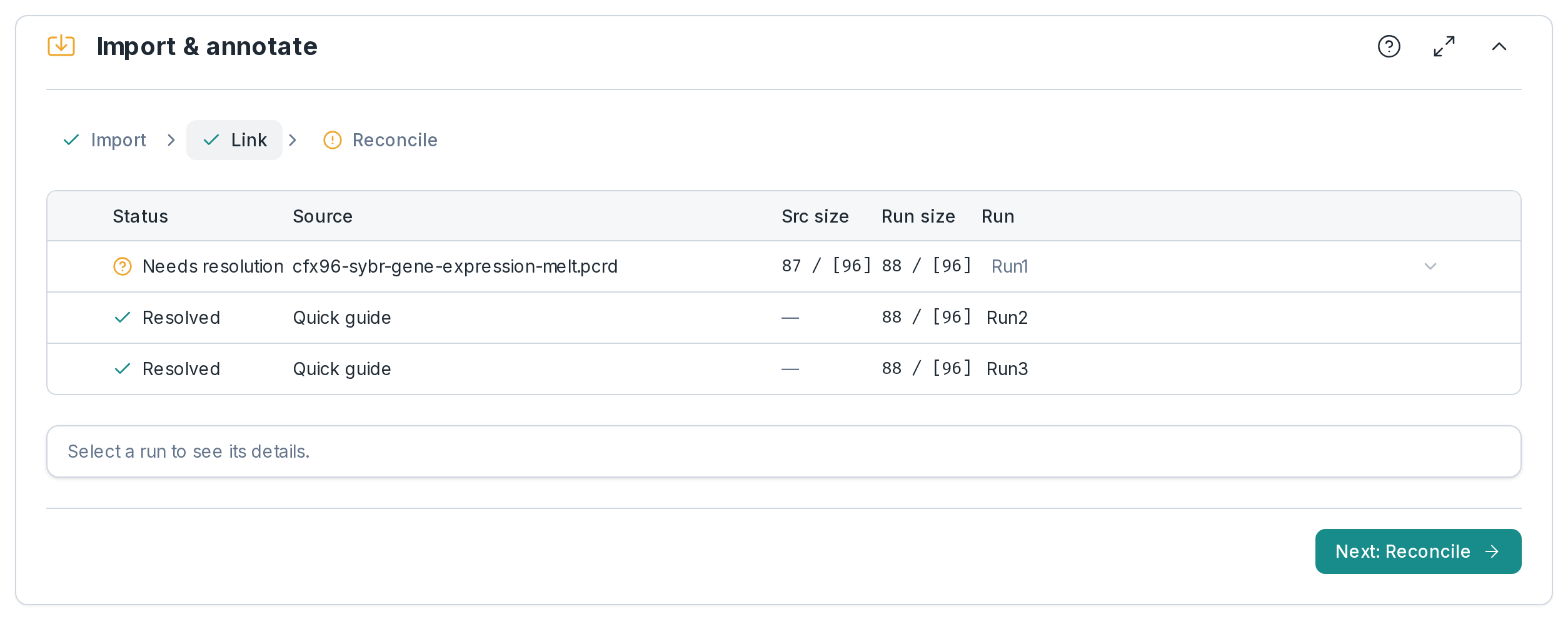
02In the app: Import & annotate › Link
Each file linked to the run you planned
Clarida suggests the planned run for each file: keep it, pick another, or make the file a run of its own. A workbook holding several runs, or a rerun that replaces a plate, is handled by linking, not by renaming files. Started without a design, each file becomes its own run.
- Link to: the suggested run, another planned run, or a new run
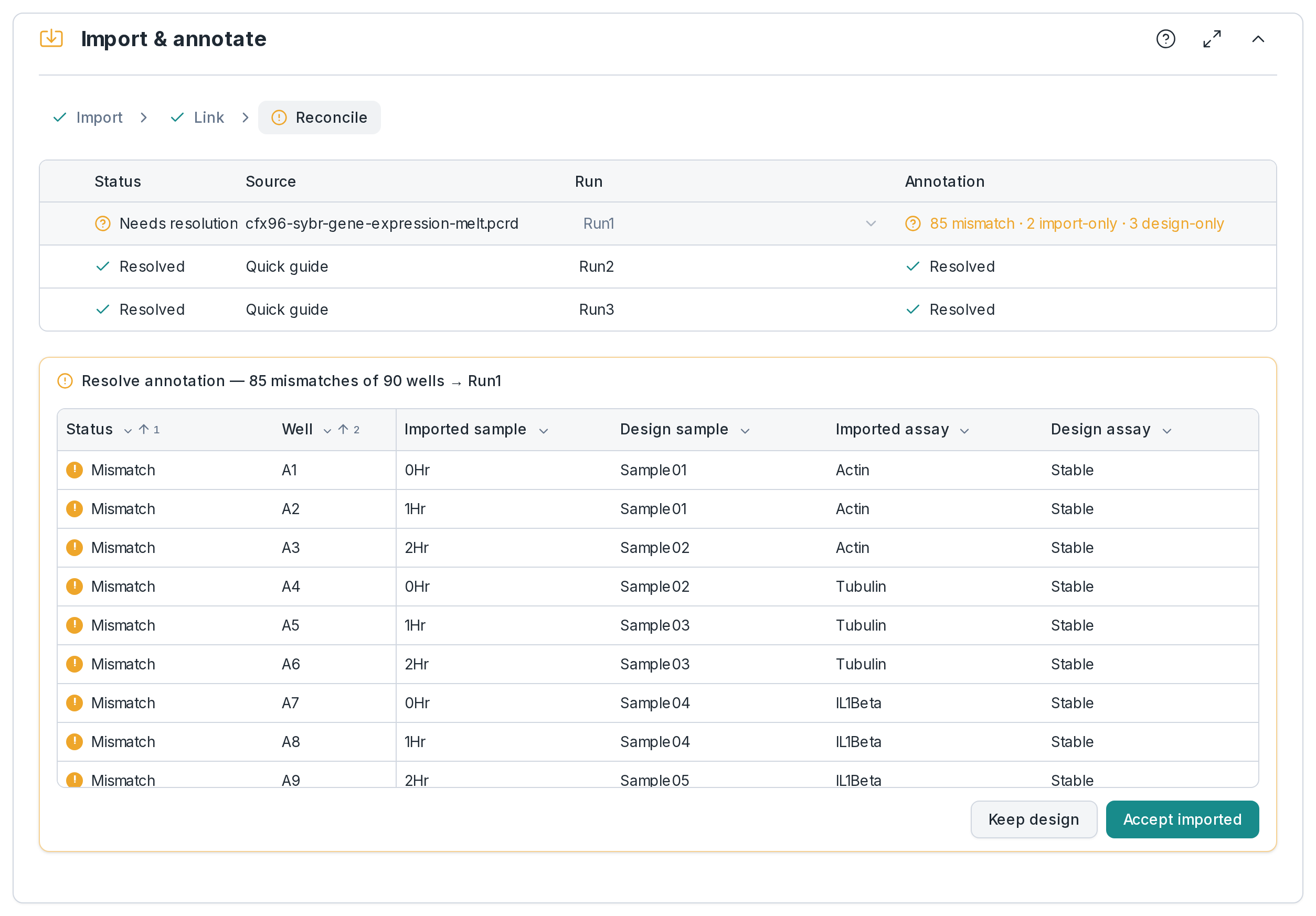
03In the app: Import & annotate › Reconcile
One decision per run where file and plate disagree
Two descriptions of the same wells now exist: your plate and the file. For a run that differs, Clarida shows how many of its wells disagree. Wells whose sample is ambiguous are settled one by one first; then you decide for the whole run, and it merges into the experiment rather than replacing what is there.
- Per run: keep your design, or accept the file’s annotation
- Undo: before merging, unlink; after, reset the run and bring it in again (its imported data goes, your file stays)
Which runs need all three stages
| Designed in Clarida | Import, link and reconcile: the run is checked against your plate |
|---|---|
| Analysis only, from a file | Import only: the file’s annotation is used, and each file becomes its own run |
What Import doesn’t do
| Curves from a Cq table | A Cq table has no curves, so calling Cq and melt need a run file |
|---|---|
| Other run files | Only those above; any other instrument comes in through its Cq table, and OpenArray runs are refused |
| qbase+ projects | Not here: they open as an experiment from their own page, free |
Frequently asked questions
How do you open a .pcrd or .eds file without CFX Maestro or QuantStudio software?
.pcrd or .eds file without CFX Maestro or QuantStudio software?Drop it into a free Clarida experiment, in the browser. It is read with its plate layout, curves and Cq; nothing to install.
Can you use Clarida if your instrument isn’t listed?
Yes. Export its Cq table (Excel, CSV or text) and import that; an RDML file from your software brings the curves too. Calling Cq and melt need the curves; everything else works from the Cq values.
Do you have to design the experiment in Clarida first?
No. Start an analysis-only experiment and drop in the file: its own annotation is used. Design first when you want the run checked against the plate you pipetted.